How to Send a Diagnostic
Try Ask Odrive first
The latest odrive desktop client includes 🤖 Ask Odrive in the tray menu — an in-product AI assistant that can read your local logs and walk through common problems on your machine. For most issues, this is the fastest way to get help before sending a diagnostic. See Ask Odrive for details.
When you send a diagnostic, the odrive desktop client provides a report to odrive support containing troubleshooting information. A local status file called current_odrive_status.txt is also generated in your default odrive folder.
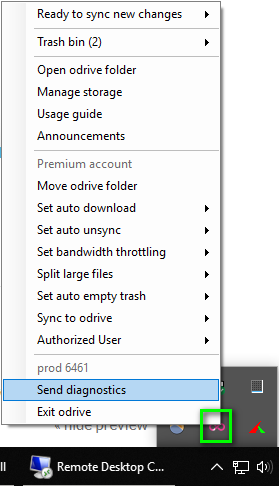
Windows
- Open the odrive tray menu from the Windows taskbar
- Select "send diagnostics" at the bottom of the menu
- Click "Send Report"
Mac
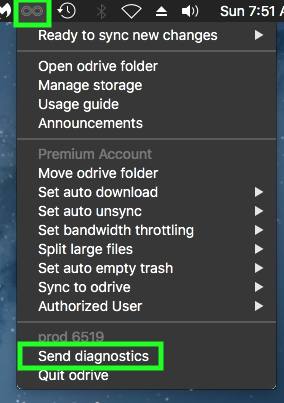
- Access the odrive tray menu from the macOS menu bar
- Select "send diagnostics" at the bottom of the menu
- Click "Send Report"
Contacting Support
After sending a diagnostic, contact odrive support with details about your issue:
- Forum: forum.odrive.com
- Support: support.odrive.com
Make sure to mention that you've sent a diagnostic and describe the issue you're experiencing.