Org View
Every odrive account includes an Organization (Org) for managing members, subscriptions, and billing. Org admins can access the Org management pages from the web client.
ORG
Org admins can access the Org management pages to manage their Organization's members, subscription, and billing settings.
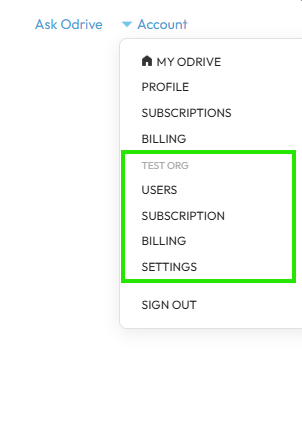
The Org management pages are organized into four sections:
- Users — Invite, remove, and manage Org members. During trial, there are no seat limits. With a paid plan, members are limited by your subscription seat count.
- Subscription — View plan details, subscribe, and manage renewal. An "Upgrade" link is displayed when your Org is on the trial plan.
- Billing — View billing history, invoices, and update payment method.
- Settings — View and edit your Org name, description, and member count.
Admin access required
Only Org admins can see and access the Org management pages. Regular Org members do not have access to these pages. See the admin documentation for more details.
ADDITIONAL RESOURCES
Learn more about Orgs from these other places:
- The Organizations Features page has a high-level overview of Orgs and how they work.
- Go to our Managing Your Organization user manual page to get detailed step-by-step instructions on how to manage your Org.